PRIMARY FORMS REPORTS:
1. Respondents: Select the form -Responses not Given/Responses Given and the Assigned role.
Note: Do not include the Activity/Event filter in this search. This report runs against an Ask Once Form and queries all the people that could complete it being of the selected Speaker type.
Forms > Primary Form Reports > Respondents
2. Form Responses Report:
Run Report > Forms > Primary Form Reports > Responses
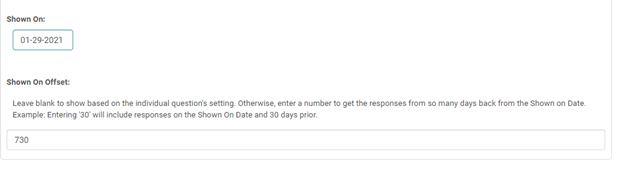
To run the above report for the Financial Disclosure responses for people on a specific Activity : Select the form, Select the Activity under 'Other' Filter and use the below 'Shown On Offset ' to see the relationship responses disclosed before a certain number of days from the date shown under the 'Shown On' field.
3. Responses Summary: This report gives a summary with response count and percentage for all the objective type questions such as True or false; check many; choose many; select one. Participants’ responses for free form questions are shown with the respondent name, city, state and country.
Run Report > Forms > Primary Form Reports > Responses – Summary
4. Responses – Summary with Comments:
Run Report > Forms > Primary Form Reports > Responses - Summary with Comments
5. Test results:
Primary Form Reports> Test results
ADVANCED FORM REPORTS:
1. Advanced Form Reports: Select the question- Restrict display results to the selected question. This would give responses as completed/confirmed for the selected question, on the selected form, on every activity by all individuals. Report result can be restricted to the selected questions.
Forms - Advanced Form Reports -select the form- select the questions and responses as needed