Global credit claiming conflict checking is turned on to stop attendees from claiming credits for sessions that have an overlapping dates/time. This setting is turned on for each session type - general(live), enduring and MOC/Self-Assessment, individually.
On most of the sites this setting is turned on for general(live) sessions and turned off for Enduring Materials and Self-Assessment.
Now, we have enabled credit claiming conflict checking on activity by activity basis. This new functionality provides these options on the Activity Information page.
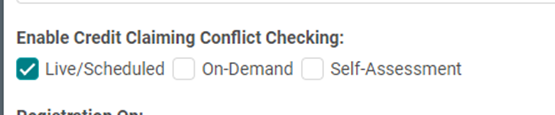
- The check boxes’ default values come from the site settings. If your site has the Live/Scheduled option pre-selected conflict checking is turned on for live sessions on your site.
- If needed, you can unselect this option to exclude conflict checking for a specific activity’s sessions.
- If unselected, attendees can claim credits for live sessions with overlapping dates/times of this activity’s sessions.
Exception: There are sites that do not have the global setting turned on for any of the session types.
If your site falls under this exception, you will notice that the live/scheduled option is not pre-selected. This means attendees are allowed to claim for live sessions with overlapping dates/times on all activities. You do not need to take any action as all the existing rules will be respected until further changes are requested.

If you would like to enforce conflict checks for a session type of an activity, simply select the check box next to the desired session type.
Note: Additionally, there are also settings to include external credits in the conflict checking and to exclude some session types from the conflict checking. These settings will be applied regardless of the activity setup.