Claiming Permissions are useful when you want to restrict claiming to specific sessions. Claiming permissions are entered on the product page. You can add as many Registration products as you want and set different claiming permissions on each product and have an individual select one of those products. Thus you can control claiming based on the product purchased by the participant.
Note: Make sure all the set up is done before the Registration starts. Any adjustments to the product claiming permissions after the Registration starts may affect the users registered before the changes were made.
In the example scenario below there are three sessions under an Activity. Given under are the different options you could choose to control credit claiming for all of these sessions.
Claiming permission set up option 1: Full Access
Select the ‘Activity’ and go to ‘Manage Activity Products’ and add a Registration Product like you would normally do. Scroll down to the bottom of the page where you will see claiming permission field options.If you want to allow claiming for all the sessions for those who purchase this product set the ‘Claiming Permissions Full Access = Yes’ like shown in the below screen shot.
Claiming permission set up option 2: Restricting by Date(s)
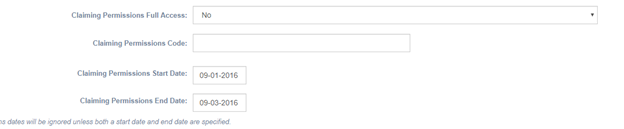
If you want to allow claiming for only the sessions that happened on 09/02/2016 add a product, for example called the “Sept 3 Event Registration” and set the ‘Claiming Permissions Full Access = NO’ and enter the date(s) like shown below.
Note: When you are allowing claiming permission for more than one session enter the start date of each session separated by a comma.

Note: When there is an option to specify the date range and you are allowing more than one session for claiming, enter the Start date of the first session and the End date of the last session such that all the sessions that fall within specified time range are available for claiming.
Claiming permission set up option 3: Restricting by Code
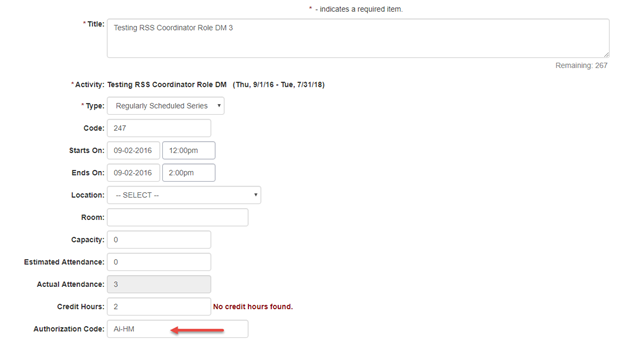
If you want to allow claiming based on the Authorization Code set the ‘Claiming Permissions Full Access = NO’ and enter the code in ‘Claiming Permissions Code’ field.

Note: This code should match with the Authorization Code on the Session page
Other scenarios:
Scenario 1: A separate registration for half day participants and have them claim only for the hours they participated in the Session. You can follow the setup as below
For example:
Session 1
- Session Name: Half Day Session
- Starts - 12/7/2010 - 09:00 am
- Ends - 12/7/2019 - 12:00 pm
- Add a CEU Authorization code on the Session
- Add a Registration product for Session 1
- Flag Claiming Permission Full Access = No
- enter the code you entered on the Half Day Session 'Claiming Permission Code' field
- Users who bought this registration product can only claim the credit hours entered for this Session
Session 2
- Session Name: Full Day Session
- Starts - 12/7/2010 - 09:00 am
- Ends - 12/7/2019 - 05:00 pm
- Add a CEU Authorization code on the Session
- Add a Registration product for Session 2
- Flag Claiming Permission Full Access = No
- enter the code you entered on the Full Day Session 'Claiming Permission Code' field
- Users who bought this registration product can only claim the credit hours entered for this Session
Note: When you need to split a Single Session into two Sessions with different credit hours, you don't add a Reg product with full claiming permissions.
Scenario 2: If you have full conference reg product along with single day registration choice, follow the below setup
-
Full conference Registration: Full price product
- Claiming Permissions Full Access = Yes
-
Single Day Registration : Note: Add a comment on the product title instructing users to choose he additional product of their choice. If all the additional products are single day products with the same reg fees, add the price on this product. If not , this product is set up as a '0' dollar product and add the ref fees on the additional products.
- Claiming Permissions Full Access = No
- Claiming Permissions Code = (leave blank)
- Claiming Permissions Dates = [comma-deiimited list of dates for the activity]
-
Additional Products providing access to claim for that session:
- Claiming Permissions Full Access = No
- Claiming Permissions Code = [Code(s) corresponding to the Authorization codes for the optional session(s)]
- Claiming Permissions Dates = (leave blank)
Note: By registering for anything with "Full Access", gives the user the ability to claim for any session in the activity, even if it has a specific Authorization Code. So add the Authorization code on the optional sessions.