NOTE: The 'Remove Person' option only shows up when a person is assigned to content or functionality in the system. If you do not see the 'Remove Person' option, you can Inactivate the person (See the 'Inactivating a Person' article)
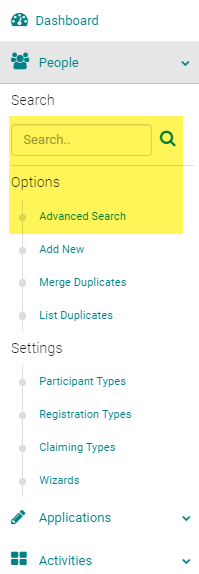
Go to People > use the search box or 'Advanced Search' for the person you want to remove
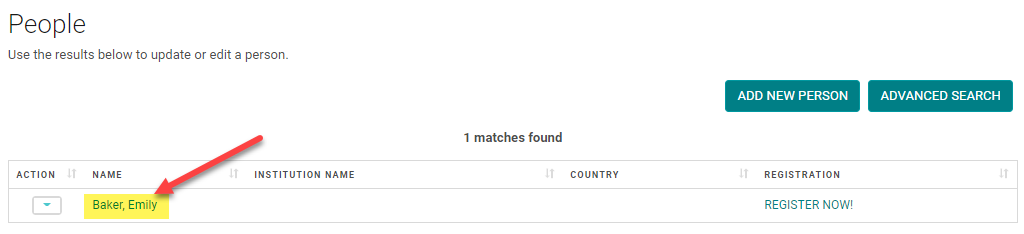
Click on the Name of the person
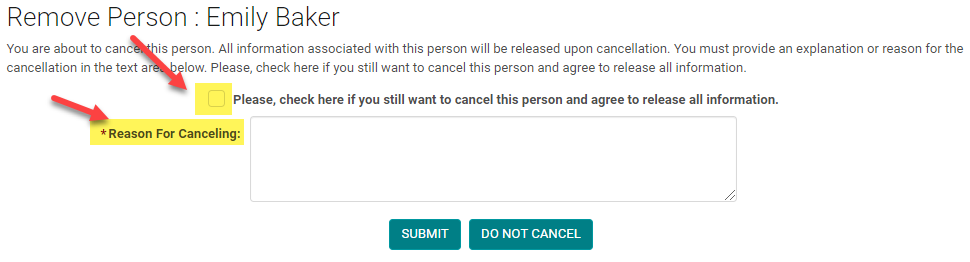
Click the 'Remove Person' button

Check the box, enter a reason for canceling the person, and click 'Submit'.
NOTE: All assignments will be removed from the person, including Submissions, Sessions, Completed Forms, etc.
NOTE: You can still search for a canceled person using the People > Advanced Search > search by Status = Inactive and Canceled = Yes